Transparency without sorting
For the longest time I couldn't get transparency right in Voxelize. Grass and glass never looked right, faces would disappear behind portals, and seaweed under water would flicker in and out.
three.js draws see-through things one at a time, back to front, so something has to decide the order. Voxelize had a long sorting table for every voxel type, which is super edge-case prone. Sandwich a ring of glass inside a U of leaves and no order works, because each one is half in front of the other and half behind it.
Back in college I looked into order-independent transparency, a way to draw see-through things correctly in any order. It's just not supported in three.js.

three-wboit seemed promising, but it made the textures look super odd and saturated. So recently I decided to implement it myself, with the help of Opus 5.5.
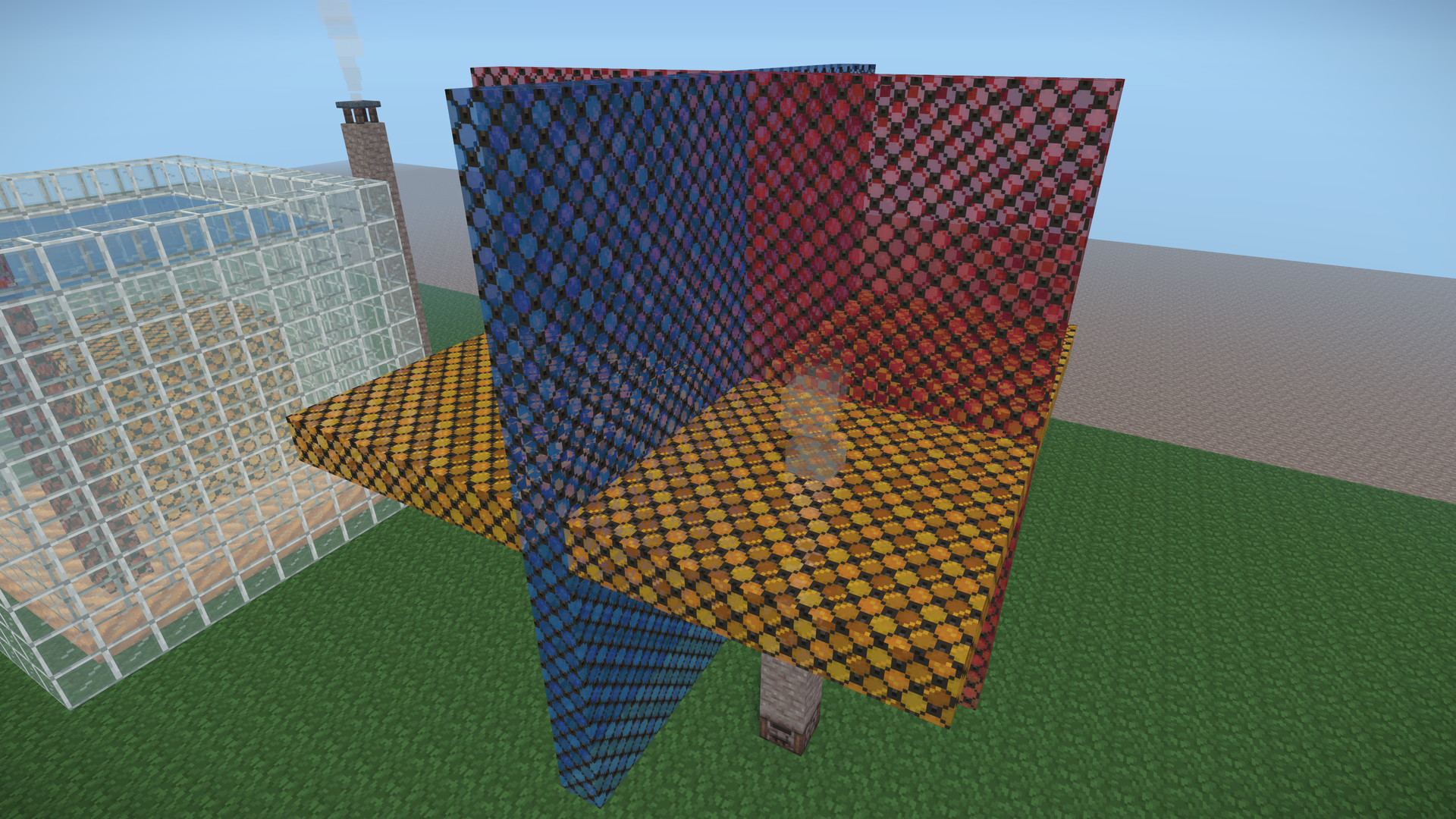
Three planes of stained glass cross at one point. Drag the handle: the left side is what a renderer that sorts its transparent surfaces draws, the right side is what Voxelize draws now.
 SortedOrder-independent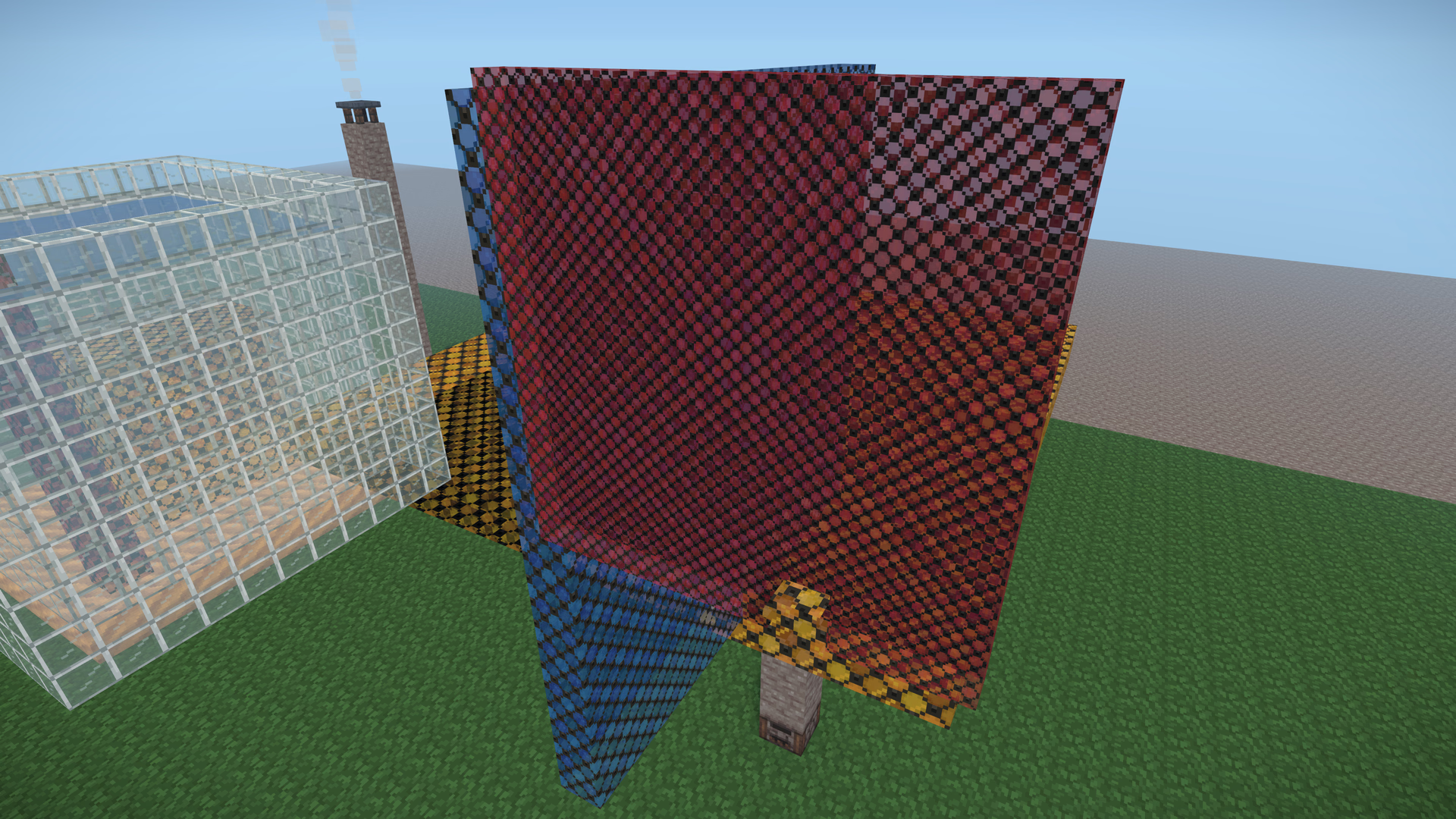
Nothing on the left is a bug in the sort. Each plane is in front of the other two over half of its area and behind them over the other half, so any order that draws one plane before another is wrong for half the picture. There is no right order to find.
If you've ever put two transparent things in a three.js scene, you know the ritual: depthWrite: false, a renderOrder here, an alphaTest there, and some corner of the scene you just don't point the camera at. A voxel world has no such corner. One mesh holds every glass face of a chunk section, water refracts whatever is behind it, smoke drifts through windows, axolotls swim behind aquarium glass, and players build exactly the shapes that break sorting, on purpose, because they look cool.
Every see-through thing the engine draws (water, glass, leaves, smoke, rain, foam, bubbles, fire, sprites, a creature's effects, a game's own shaders) now blends by its distance from the eye, in whatever order three.js happens to draw it. Not just the chunks: the whole renderer. The water still bends what's behind it, stained glass keeps its lead lines, and frame times went down, not up.
This is the full breakdown: why sorting can't work, the math that replaces it, how it hooks into three.js without forking it, how it reaches every material in the scene, the two hard parts (water and stained glass), what the GPU buffers actually hold, and where it's still wrong. Every capture is from the engine, at 3840×2160; click any of them for the full frame.
How I got here
Four bug reports, each a few days apart:
- Water showed through stained glass. A pool behind a window painted itself over the window.
- Leaves above and below the water, in the same chunk section, landed on the wrong side of the surface.
- A glass tunnel through a pool drew on top of the water.
- Chimney smoke disappeared behind a glass wall it was rising in front of.
Each fix was a new rule in the sorter: sort the faces inside every glass mesh, split glass at the water's depth per pixel, place every effect by the medium it is in (air or water). Each rule was correct, and each one produced the next bug. Faces sorted fine until two materials interleaved; the water split worked until there were two layers of water; the medium rule needed every particle system to split itself into a wet mesh and a dry mesh every frame. Four rules in, the sorter was the most complicated code in the renderer, and it still had a list of shapes it couldn't draw.
That's when I stopped asking what order to draw in.
Why sorting can't work
Blending paints a layer over what's already there:
dst = src.rgb · src.a + dst · (1 − src.a)
Apply that to a stack of layers, nearest first, and the exact result is:
C  = Σᵢ αᵢ · Cᵢ · Tᵢ  +  C_background · Πᵢ (1 − αᵢ)

Tᵢ = Π (1 − αⱼ)   over every layer j in front of layer i
Tᵢ is how much of layer i survives the layers in front of it, and it is the only part of that formula that cares about order. Hold on to it: the whole technique is about replacing it.
three.js gets the order per object. Every transparent object goes into a list with one depth (its bounding-sphere centre, projected), and the list is sorted like this, straight from WebGLRenderLists.js:
function reversePainterSortStable(a, b) {
  if (a.groupOrder !== b.groupOrder) return a.groupOrder - b.groupOrder;
  else if (a.renderOrder !== b.renderOrder) return a.renderOrder - b.renderOrder;
  else if (a.z !== b.z) return b.z - a.z; // back to front
  else return a.id - b.id;
}
Inside a mesh nothing is sorted at all: triangles draw in index order. One depth per object, one order per mesh. A voxel world breaks both.
One depth per object. The planes above are three meshes whose centres are nearly the same point, so whichever sorts last covers the other two everywhere. A box sunk in a pool, a tunnel through a tank, a canopy over a pond: each is in front of the water at some pixels and behind it at others.
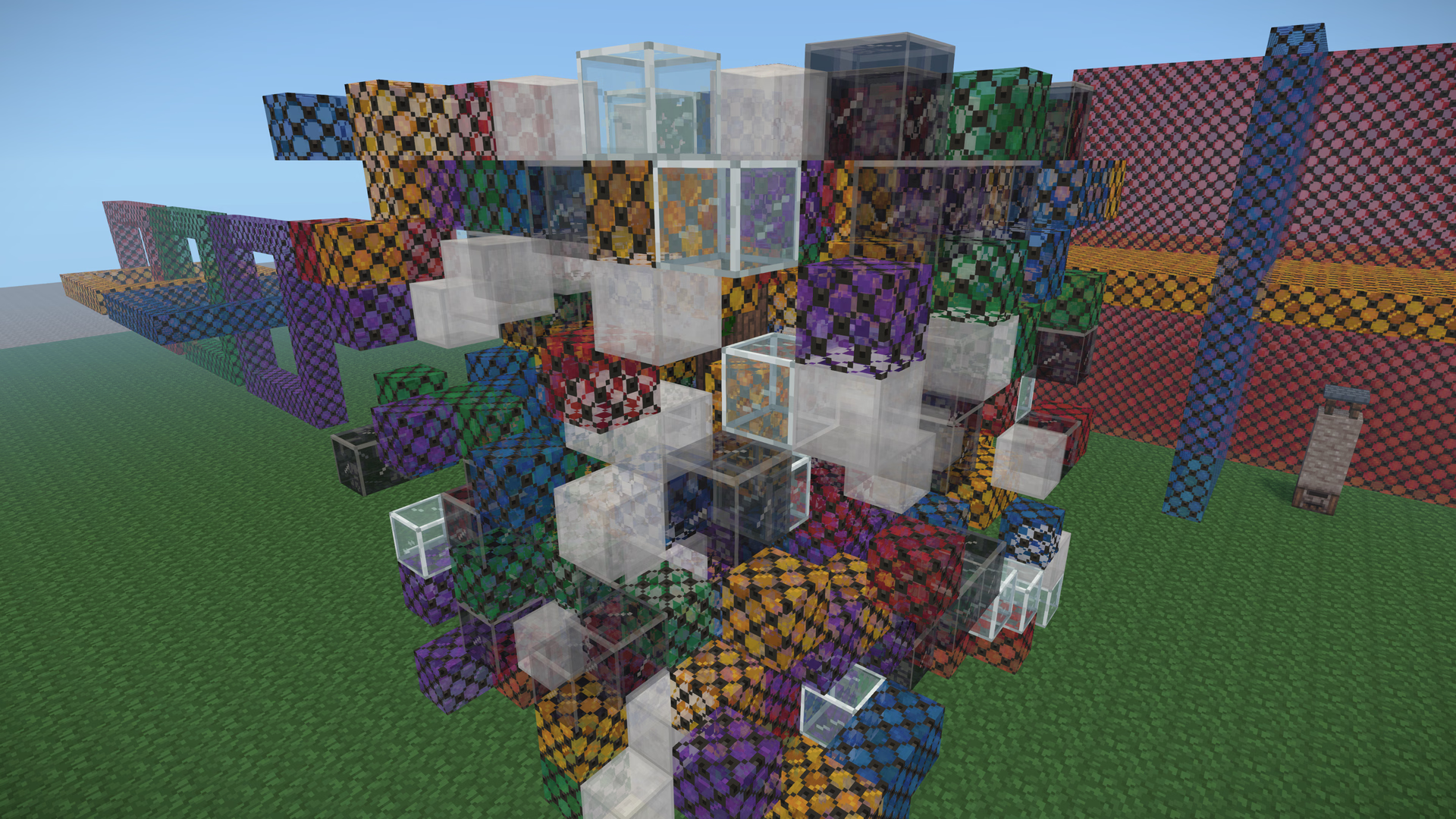
One order per mesh. A voxel engine batches every face of a material in a chunk section into one mesh, so sorting happens per material, never per block. Scatter nine kinds of see-through block through a cube, and a sorted renderer stacks them by material:
 SortedOrder-independent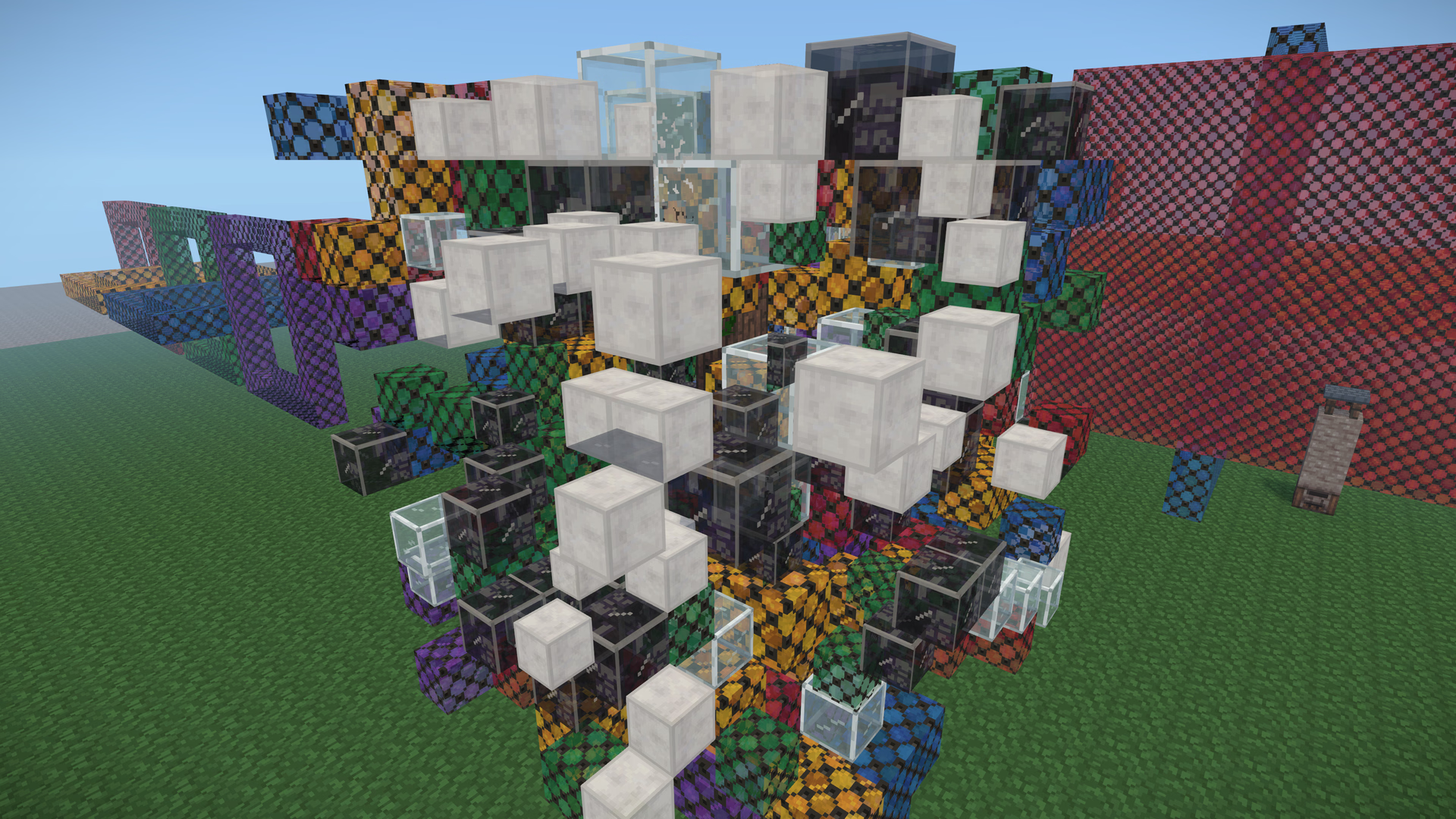
No order at all. Even sorting every triangle fails when surfaces cross or overlap in a cycle, like the planes, or a chain of links each threaded through the next. The fix for that is cutting triangles where they cross (a BSP tree), every frame, in a world that remeshes every time a block changes.
Water reads the frame. Voxelize's water refracts: its shader samples the scene behind it. So everything behind the water has to be finished before the water draws, and everything in front of it has to wait until after, per pixel, because the same glass block is behind the surface from above and in front of it from below.
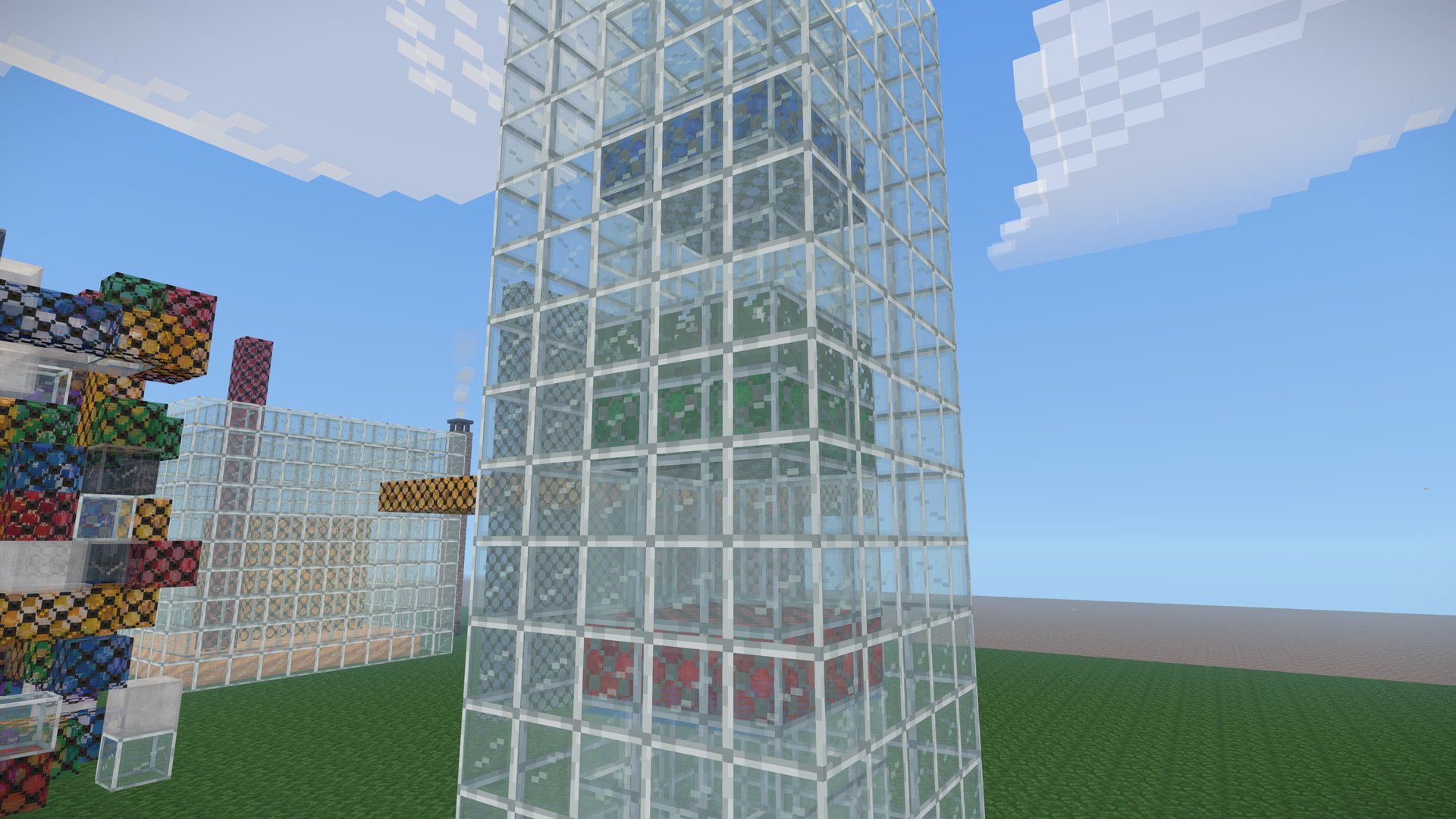 SortedOrder-independent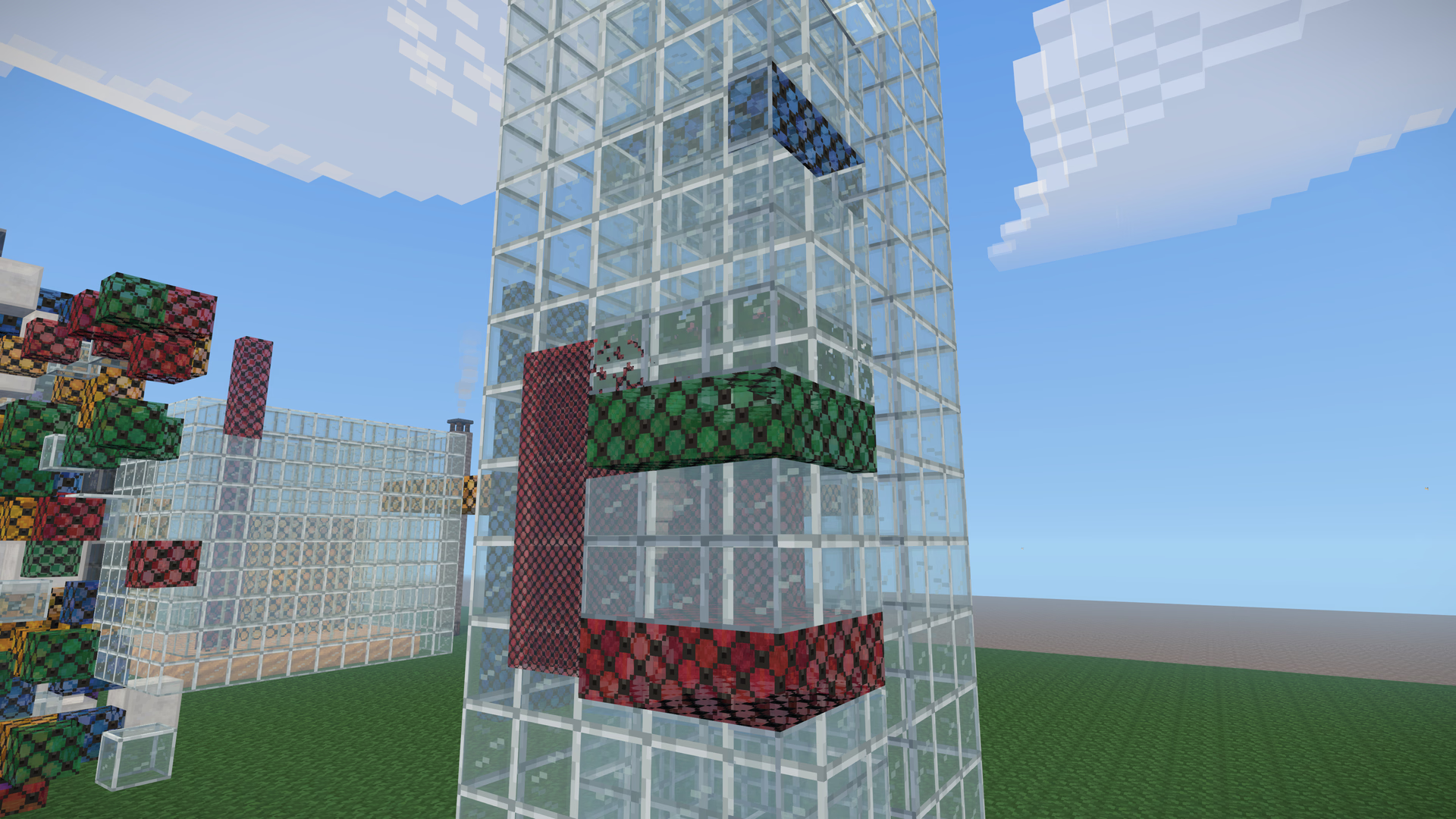
The two classic knobs don't help either. With depthWrite on, a near pane drawn first hides everything behind it; with it off, a far pane drawn later paints straight over a near one. And side: DoubleSide is its own little sort: three draws a double-sided transparent material twice, back faces first and then front faces, which is correct for exactly one convex object and wrong for everything else.
What else was on the table
| Technique | Why not here |
|---|---|
| Sort harder: every triangle, every frame | CPU time every frame, and still wrong for crossings and cycles |
| Depth peeling | A full geometry pass per layer; the cube above has many layers |
| Dual depth peeling | Half the passes, still a pass per pair of layers |
| Per-pixel linked lists (A-buffer) | Needs atomics and storage buffers; WebGL2 has neither |
| Moment-based OIT | Better colour, but two geometry passes and more targets |
| Stochastic transparency | Noise, unless the whole frame is built around temporal anti-aliasing |
| Alpha to coverage | Needs multisampling, and gives as many alpha levels as samples |
| Weighted blended OIT | One geometry pass, two render targets, fits WebGL2 |
The math: replace the order with a weight
Here's the identity that makes it work. With layers nearest first, the visible shares add up to exactly the coverage:
Σᵢ αᵢ Tᵢ = α₁ + (1 − α₁)α₂ + (1 − α₁)(1 − α₂)α₃ + … = 1 − Πᵢ (1 − αᵢ)
The sum telescopes. So the exact colour can be rewritten as a normalised weighted average of the layer colours, times the coverage:
C = ( Σ αᵢ Tᵢ Cᵢ / Σ αᵢ Tᵢ ) · (1 − Π(1 − αᵢ)) + C_background · Π(1 − αᵢ)
Everything in there is order-independent except Tᵢ, the weight inside the average. Weighted blended order-independent transparency (McGuire and Bavoil, 2013) swaps Tᵢ for a function of depth, on the bet that farther layers are usually behind more stuff:
C ≈ ( Σ αᵢ w(dᵢ) Cᵢ / Σ αᵢ w(dᵢ) ) · (1 − Π(1 − αᵢ)) + C_background · Π(1 − αᵢ)
Now every term is a sum or a product, and both commute. Draw the layers in any order and you get the same pixel. The coverage, 1 − Π(1 − αᵢ), is the same product a perfect sort computes, so a stack of glass never lets through more or less of the scene than it should. Only the way the visible colour is shared between overlapping layers is approximate.
The weight curve
Voxelize's weight is a function of distance from the eye, in blocks:
float w = clamp(10.0 / (1e-5 + pow(d / 10.0, 3.0) + pow(d / 200.0, 6.0)), 0.01, 1000.0);
| Distance (blocks) | 1 | 2 | 3 | 5 | 10 | 20 | 50 | 100+ |
|---|---|---|---|---|---|---|---|---|
| Weight | 1000 | 1000 | 370 | 80 | 10 | 1.25 | 0.08 | 0.01 |
It has three regimes:
- Closer than about 2.15 blocks it is clamped at 1000, so layers right in front of your face average evenly.
- Between about 2 and 100 blocks the cubic term rules, and the weight ratio of two layers is
(d₂ / d₁)³. A layer twice as far away gets an eighth of the weight. Because only the ratio matters, a scene mixes the same way whether you stand next to it or across a valley. - Past about 100 blocks it is clamped at 0.01, so everything far away averages evenly. The sixth-power term, from the paper's family of curves, steepens the fall past about 200 blocks, but at these defaults the lower clamp gets there first; it only comes into play if you lower
min.
The upper clamp also keeps the sums inside half-float range: a fragment adds at most 1 · 1 · 1000 to the colour sum, and a 16-bit float tops out at 65504, so about sixty full-weight layers fit in one pixel before anything saturates.
How wrong is it?
A red pane (α 0.59) in front of a blue pane (α 0.59), over white. These are the real pane colours from the textures, composited in linear light:
| Red at | Blue at | Exact | Weighted | Wrong order |
|---|---|---|---|---|
| 4 blocks | 12 blocks | 169, 128, 142 | 182, 123, 126 | 143, 136, 163 |
| 6 blocks | 7 blocks | 169, 128, 142 | 163, 130, 147 | 143, 136, 163 |
The exact visible shares are α_red : (1 − α_red) · α_blue, or about 2.4 to 1. At 4 and 12 blocks the weights give (12 / 4)³, 27 to 1, so the result overshoots: redder than exact. At 6 and 7 blocks they give 1.6 to 1, so it falls a little short, slightly too blue. It is exact for this pair when the farther pane is ∛2.4 ≈ 1.35 times as far away. What it never does is lean the wrong way: the wrong order gives the near pane (1 − α_blue) · α_red : α_blue, 0.4 to 1, and since the weights fall with distance, the near layer always gets more than that.
Stack some layers yourself, shuffle the order they draw in, and compare. The sorted blend changes with the order; the sums don't:
Three sums in two render targets
Two of the sums add and one multiplies, and they need somewhere to live. The accumulation target has two attachments:
| Attachment | Format | Cleared to | Holds |
|---|---|---|---|
| 0 | RGBA, half-float | (0, 0, 0, 1) | RGB: Σ C·α·w. Alpha: Π(1 − α) |
| 1 | R, half-float | 0 | Σ α·w |
WebGL2 gives every attachment of a framebuffer the same blend function (blending per attachment is OES_draw_buffers_indexed, an extension you can't count on), so one state has to do all three jobs. It can:
// RGB adds. Alpha is multiplied by (1 − source alpha).
gl.blendEquationSeparate(gl.FUNC_ADD, gl.FUNC_ADD);
gl.blendFuncSeparate(gl.ONE, gl.ONE, gl.ZERO, gl.ONE_MINUS_SRC_ALPHA);
The shader writes premultiplied, weighted colour with the plain alpha into attachment 0: the RGB adds into the colour sum, and the alpha multiplies the cleared 1 down into the product of transmittances. Into attachment 1 it writes α·w in red with alpha 0: the red adds into the weight sum, and alpha 0 leaves the rest alone. Same state, three different jobs.
Then one full-screen pass turns the sums into a layer over the scene:
ivec2 pixel = ivec2(gl_FragCoord.xy);
vec4 accumulation = texelFetch(tAccumulation, pixel, 0);
float coverage = 1.0 - accumulation.a;          // 1 − Π(1 − α)
if (coverage <= 0.0) discard;                   // nothing translucent here
float weight = texelFetch(tWeight, pixel, 0).r; // Σ α·w
gl_FragColor = vec4(accumulation.rgb / max(weight, 1e-5) * coverage, coverage);
// blended ONE, ONE_MINUS_SRC_ALPHA over the scene (alpha: ZERO, ONE)
The output is premultiplied, so it blends with ONE, ONE_MINUS_SRC_ALPHA, and the alpha factors (ZERO, ONE) leave the scene target's own alpha untouched. The accumulation target is two half-float attachments: 10 bytes a pixel, about 9 MB at 720p and 83 MB at 4K.
Here is what those targets actually held for the frame at the top of this post, read back through a debug shader:
The frame as a player sees it. For these captures the water split was off, so every translucent layer went through one accumulation; the tank on the left blends by weight instead of refracting.
Getting inside three.js's render()
three.js draws a frame like this: walk the scene graph, sort what it finds into an opaque list and a transparent list (plus one for transmission), then draw the opaque list and the transparent list, back to back, inside one renderer.render() call. There is no hook between the lists, and the pass needs three: open the accumulation after the opaque world, close it after the last blended surface, and, with water in view, split it in the middle.
The hooks are meshes that draw nothing. three calls an object's onBeforeRender right before drawing it, and that is a perfectly good place to switch render targets:
this.open = new Mesh(marker, markerMaterial); // colorWrite false, depthTest false
this.open.frustumCulled = false;
this.open.renderOrder = OIT_OPEN_RENDER_ORDER; // -0.5
this.open.onBeforeRender = (renderer, scene, camera) =>
  this.begin(renderer, scene, camera); // bind the accumulation, clear it

this.close = new Mesh(this.compositeGeometry, this.composite);
this.close.frustumCulled = false;
this.close.renderOrder = OIT_CLOSE_RENDER_ORDER; // 999 999
this.close.onBeforeRender = (renderer) => this.end(renderer); // back to the scene
The close marker is the composite itself: one triangle covering the screen, whose geometry only gets a draw range while a frame is accumulating, so a render that never opened draws nothing. Then the world installs its own sort with renderer.setTransparentSort, and that sort places every item in a band by what it writes, not by the render order it came with:
| Band | Render order | What draws there |
|---|---|---|
| Sky | below 0 | the sky, in its own order |
| Depth writers | -0.75 | cutouts, solid texels, anything that writes depth |
| Open | -0.5 | bind the accumulation and clear it |
| Blended | 0 | everything that accumulates |
| Split | 999 998 | with water in view: composite what's behind it |
| Close | 999 999 | composite over the scene |
| After | 999 999.5 | additive light, and blends that can't accumulate |
| Overlays | 1 000 000 and up | name tags and the like, in their own order |
Step through a frame:
The accumulation target borrows the scene target's depth texture rather than having its own, so blended fragments are depth-tested against the terrain, the cutouts and every opaque creature for free, and write nothing to it:
const accumulation = new WebGLRenderTarget(target.width, target.height, {
  count: 2,
  type: HalfFloatType,
  format: RGBAFormat,
  depthBuffer: true,
  depthTexture, // the scene target's own
  minFilter: NearestFilter,
  magFilter: NearestFilter,
  generateMipmaps: false,
});
accumulation.textures[1].format = RedFormat;
One trap: disposing a render target in three also disposes its depth texture, and this one belongs to the scene. The accumulation detaches it (accumulation.depthTexture = null) before it disposes.
The last piece is the blend state. three sets it from each material as it draws, so during the accumulation the pass has to override it per draw. Patching renderer.state.setBlending does nothing, because WebGLState's setMaterial calls setBlending through a closure, not through the object. So the seam is setMaterial:
const setMaterial = state.setMaterial;
state.setMaterial = (...args) => {
  setMaterial(...args);
  if (!adopted.has(args[0])) return;
  state.setBlending(
    CustomBlending,
    AddEquation, OneFactor, OneFactor,
    AddEquation, ZeroFactor, OneMinusSrcAlphaFactor,
    BLACK, 0, false,
  );
};
It's installed when the accumulation opens and removed when it closes, so nothing outside the band ever sees it.
Adopting every material, automatically
Nothing has to opt in. The first time the world's sort meets a transparent material that writes no depth, it classifies it, and if it can accumulate, it wraps the material's fragment shader in an encoder from onBeforeCompile:
#define main orderIndependentShade
// ...the material's own fragment shader, untouched...
#undef main
layout(location = 1) out highp vec4 pc_fragOitWeight;
void main() {
  orderIndependentShade();
  pc_fragOitWeight = vec4(0.0);
  if (uOitActive < 0.5) return; // any other render: its ordinary colour
  float oitAlpha = clamp(gl_FragColor.a, 0.0, 1.0);
  if (oitAlpha <= 0.0) discard;
  float oitDistance = oitDistanceAt(gl_FragCoord.z);
  float oitDepthWeight = clamp(
    uOitWeight.x / (1e-5
      + pow(oitDistance / uOitWeight.y, 3.0)
      + pow(oitDistance / uOitWeight.z, 6.0)),
    uOitWeightRange.x,
    uOitWeightRange.y
  );
  float oitWeight = oitAlpha * oitDepthWeight;
  gl_FragColor = vec4(gl_FragColor.rgb * oitAlpha * oitWeight, oitAlpha);
  pc_fragOitWeight = vec4(oitAlpha * oitWeight, 0.0, 0.0, 0.0);
}
The details that carry most of the weight:
- The preprocessor renames
main, instead of a string replace. Shader hooks love to findvoid main() {and inject after it; my game's atmosphere and fog driver does exactly that. Since the material's ownmainis still spelledmainin its source, every other hook still edits the material's body, and the hooks compose in any order. - The program cache key gains a mark (
|order-independent-straight, or-premultiplied), so a wrapped program is never shared with an unwrapped twin. There's a subtlety: three's default cache key is the hook's source text,onBeforeCompile.toString(). The wrapper forwardstoStringto the hook it replaced, so materials that had different hooks keep different keys. uOitActiveis a uniform. The same program draws its ordinary colour everywhere else: inventory previews, portraits, shadow passes. No second program.forceSinglePass = true. No more back-then-front double draw. With sums there is nothing to fake.oitDistanceAtlinearises depth with the camera's near and far planes, so the weight works in blocks rather than in the depth buffer's skewed units.- Premultiplied materials skip the
· oitAlphaon their colour. The classifier knows which is which.
Not everything should accumulate, and the classifier sends each kind where it belongs:
| Material | Where it goes |
|---|---|
| Normal blending, straight or premultiplied, or a custom blend equal to it | accumulated |
| Writes depth (cutouts, masks) | depth writers, before the accumulation |
| Additive (sparks, glows) | after the composite: adding already ignores order |
| Multiply, subtract, other custom blends, raw shaders | after the composite, and named in stats.drawnAfter |
userData[ORDER_INDEPENDENT_KEY] = false | after the composite |
Wrapping a material changes its program, so it has to happen before the first compile, or the material compiles twice, the second time in the middle of play. Hitches during play are a hard no in this engine, so the loading screen's shader warmup adopts everything it's about to compile, anything first seen later is adopted before its first draw, and anything wrapped after it already compiled is counted and named in stats.lateAdopted, so it can't hide.
The whole renderer, not just the chunks
This is the part I care about most. Order-independent transparency isn't a chunk feature: it lives in the world's transparent sort, and that sort sees every transparent thing three draws for the world. So it reaches everything, from systems that know nothing about it: creatures, particles, weather, water effects, sprites, a game's own shaders. Nothing registers, nothing opts in.
Here is what it actually did with the materials in a running session of the game I'm building on Voxelize:
| What | Examples | Band |
|---|---|---|
| Chunk see-through layers | translucent texels of glass, the water, soft leaf edges | accumulated |
| Chunk cutouts and solid texels | leaves, lead lines, window frames | depth writers |
| Particles, soft | smoke, dust, splash spray | accumulated |
| Particles and sprites, additive | sparks, glow sprites | after the composite |
| Weather | rain streaks, snow, ground splashes, lightning | accumulated |
| Water effects | ripple flecks, droplets, shore foam, breath bubbles, marine snow | accumulated |
| Creature effects | fire on a burning creature, a summoned figure's translucent aura | accumulated |
| Creatures, translucent and writing depth | jellyfish bells | depth writers |
| Overlays | name tags over creatures and players | their own order |
| Sky | sky layers, clouds, the horizon glow | their own order |
Over that session: 723 materials adopted, 48 064 renders accumulated, zero renders skipped, zero late adoptions, zero blends it couldn't take.
Creatures are the quiet win. Their bodies are opaque and write depth in the opaque pass, and because the accumulation shares the scene's depth texture, every blended layer behind a creature is depth-tested against it with no extra work. An axolotl behind aquarium glass, a bird behind a waterfall, a bear in the rain: nobody tells the glass, the water or the rain about the creature. The creature's own effects (the fire, the breath bubbles, the splashes when it jumps in) are just more transparent materials, and they accumulate like everything else.
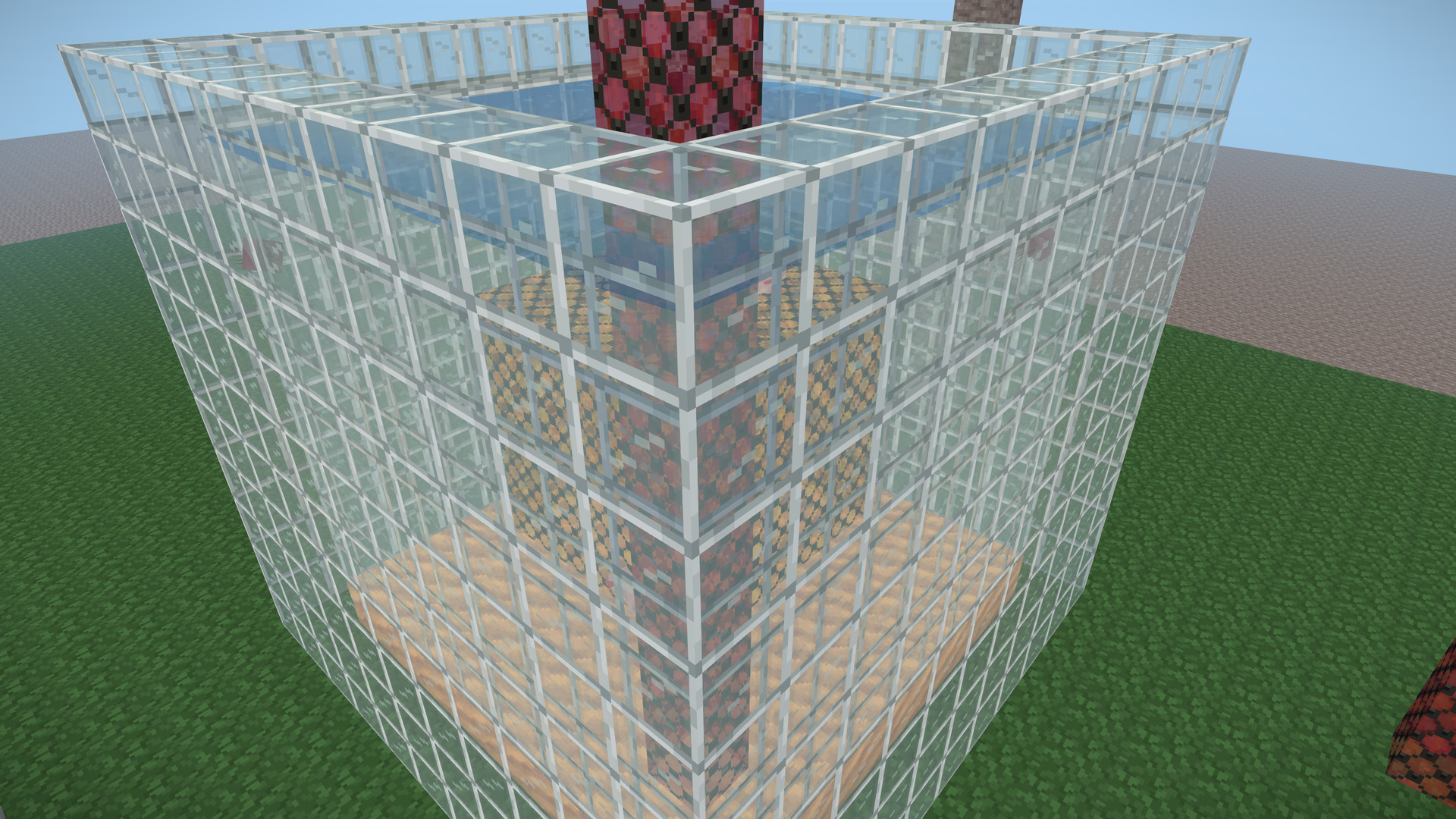 SortedOrder-independent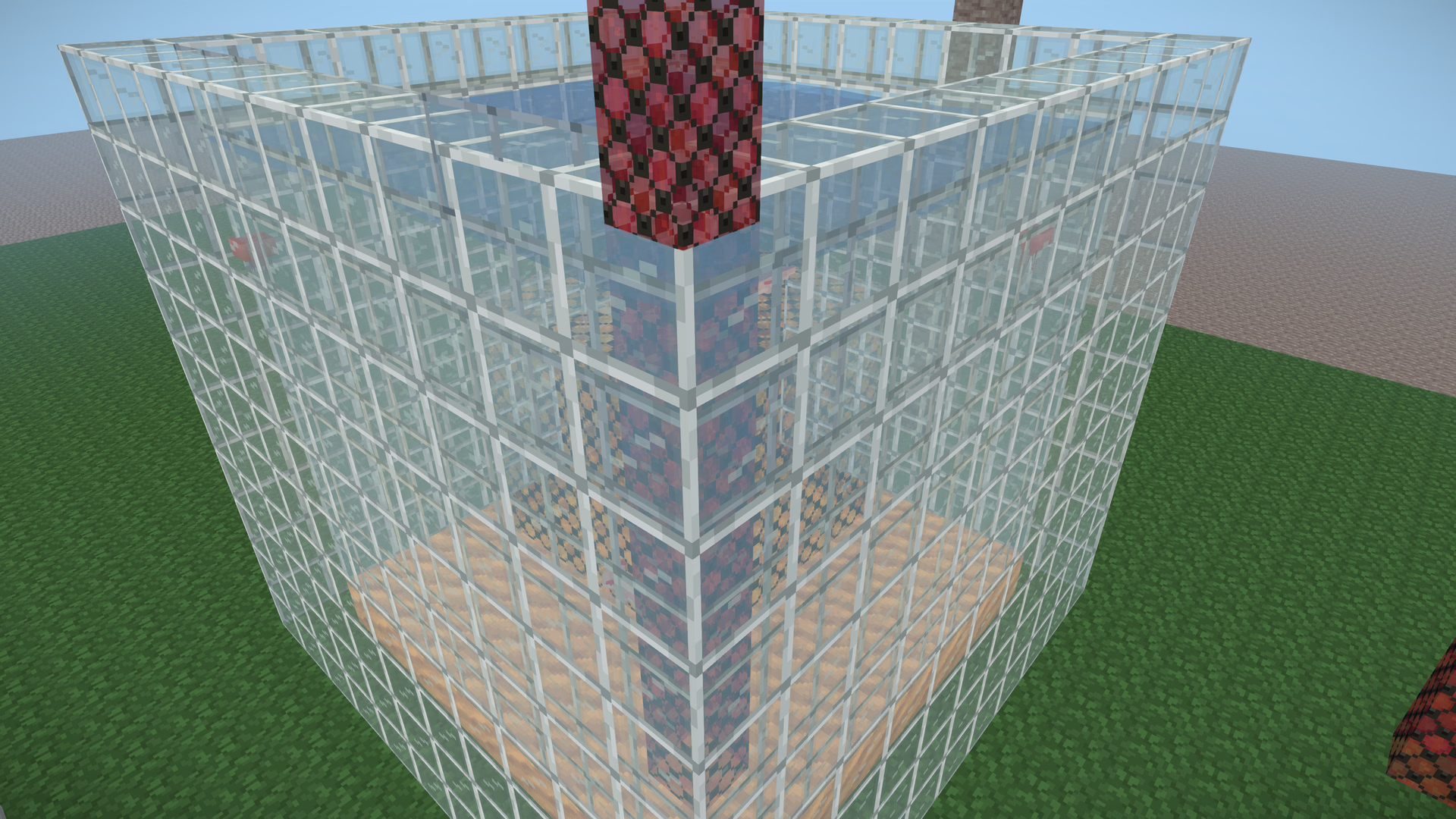
The best part is the code it deleted. Before this, every effect in the game had to pick a render order and hope:
// breath bubbles: one number from dry land, another from underwater
const RENDER_ORDER_SEEN_THROUGH_SURFACE = 100000.5;
const RENDER_ORDER_UNDER_SURFACE = 100005;
this.mesh.renderOrder =
  fogSource.submersion > 0.5
    ? RENDER_ORDER_UNDER_SURFACE
    : RENDER_ORDER_SEEN_THROUGH_SURFACE;

// marine snow
this.snow.renderOrder = 100011;

// shore foam: "after the water surface it lies on"
this.mesh.renderOrder = TRANSPARENT_FLUID_RENDER_ORDER + 1;
Every one of those numbers encoded a guess about what would be in front of what, and every one was wrong somewhere. The particle system had it worst: to land on the right side of the water, every soft particle layer had to become two meshes, one wet and one dry, and repack its particles into them every frame by checking which voxel each particle was in.
None of that means anything to the order-independent pass. A bubble is a fragment at a depth. The only thing left is a one-word hint (userData[TRANSPARENT_MEDIUM_KEY] = "water") that the sorted fallback reads on phones, and that the order-independent pass ignores.
Water splits the pass
This is where the textbook version stops working. Water refracts: its shader reads the scene behind it. In a single accumulation, nothing blended has been drawn yet when the water draws, so glass under a pool would come out unbent, and from below the surface, glass above it would show only its solid parts.
So the nearest water face splits the blended band in two, per pixel:
- Before the frame, draw the depth of every water face in view into a texture. It uses the water's own vertex shader and uniforms, so the waves in the depth match the waves on screen, and both sides of every face, so that from under the water the nearest face is the surface's underside.
- Behind. Accumulate only the fragments farther away than that depth. The rest are discarded first thing in the shader, before any of the material's own work runs.
- Split. Composite the accumulation into the scene. The water's refraction now samples a scene that holds everything behind it.
- In front. Reopen the accumulation and draw the blended band again, keeping only the fragments at or in front of the nearest water face. The water itself draws here.
- Close. Composite again.
float oitSeparator = texture2D(uOitSeparatorDepth, gl_FragCoord.xy / uOitViewport).r;
bool oitIsBehind = oitDistanceAt(gl_FragCoord.z)
  > oitDistanceAt(oitSeparator) + uOitSeparatorBias; // 0.02 blocks
if (oitIsBehind != (uOitPhase < 1.5)) discard;
The comparison runs on linear distances, with a 0.02-block bias so the water's own nearest face counts as in front of itself.
Two things here are less obvious than they look. First, there's no copy of the frame for the refraction: during the second pass the water samples the scene target while it renders into the accumulation target, which is a different framebuffer, so there's no feedback loop to break. Second, "draw the blended band again" means re-running part of three's own frame by hand. The split marker pulls this frame's transparent list out of three's render lists and repeats, for each blended item, the same steps three's draw would take:
const list = renderer.renderLists.get(scene, 0);
for (const { object, geometry, material, group } of list.transparent) {
  if (this.bandOf(object, material) !== OIT_BLENDED_RENDER_ORDER) continue;
  object.onBeforeRender(renderer, scene, camera, geometry, material, group);
  object.modelViewMatrix.multiplyMatrices(camera.matrixWorldInverse, object.matrixWorld);
  object.normalMatrix.getNormalMatrix(object.modelViewMatrix);
  material.onBeforeRender(renderer, scene, camera, geometry, object, group);
  renderer.renderBufferDirect(camera, scene, geometry, material, object, group);
  object.onAfterRender(renderer, scene, camera, geometry, material, group);
}
If the marker finds it isn't in the list being drawn (a nested render, say), it gives up on the split and draws the rest as one pass.
And there's no special case for water. A farther water face is just another fragment behind the nearest one, so water seen through water, glass sandwiched between two layers of water, and a tunnel through a tank all fall out of the same comparison. With no water in view, the band draws once.
A glass tank with a hollow amber box sunk in it and a red glass column rising out of the surface. The box and the foot of the column are behind the surface: they go through the first accumulation, get composited, and then the water bends them.
Stained glass is two materials
A stained-glass texture is lead lines and coloured panes in one image. I measured the textures in the atlas:
| Block | Opaque texels | Translucent texels | Holes |
|---|---|---|---|
| Stained glass | 34% | 66%, at α 0.59 | none |
| Framed glass | 23% | 77%, at α 0.27 | none |
| Frosted glass | none | 100%, at α 0.78 | none |
| Tinted glass | none | 100%, at α 0.69 | none |
| Outline glass | none | 25%, at α 0.44 | 75% |
| Water | none | 100%, at α 0.20 | none |
Blend the lead lines and they get averaged with whatever is behind them, when they should hide it. So the world reads its own atlas instead of trusting a block's flags. Every face's slot is classified: holes below the alpha test, solid at or above solidTexelAlpha (0.99), translucent in between. Animated textures take the union of their frames, and the classes are cached per slot and dropped whenever a slot is repainted. Then every chunk material gets a plan:
| Plan | When | Draws |
|---|---|---|
as-is | the material already draws every texel right | once |
solid | a blended material whose texels are all solid | once, as a cutout |
translucent | a cutout whose kept texels are all translucent | once, blended |
split | solid and translucent texels in one material | twice, from the same buffers |
A split draws the same geometry twice, from shared vertex buffers. The solid fork is alpha-tested at solidTexelAlpha, writes depth, and draws with the depth writers. The translucent fork is a child mesh that writes no depth, draws in the blended band, and drops the solid texels right after three's own alpha test:
shader.fragmentShader = `uniform float uSolidTexelCut;\n${shader.fragmentShader.replace(
  "#include <alphatest_fragment>",
  "#include <alphatest_fragment>\nif (diffuseColor.a >= uSolidTexelCut) discard;",
)}`;
Plans are redone whenever a texture changes, and display copies of blocks (held in a hand, dropped on the ground, standing on a shelf) split per face the same way.
In the buffers, the split is plain to see: the lead lines never enter the accumulation, and the dense frosted blocks are where revealage drops to black.
The scattered cube as a player sees it.
Turning it on in Voxelize
It's one world option, plus a depth texture on the target the world renders into:
import * as VOXELIZE from "@voxelize/core";
import { EffectComposer, RenderPass } from "postprocessing";

const world = new VOXELIZE.World({
  orderIndependentTransparency: VOXELIZE.defaultOrderIndependentTransparencyOptions,
});

const composer = new EffectComposer(renderer);
composer.addPass(new RenderPass(world, camera));
composer.createDepthTexture(); // the blended layers accumulate against the scene's depth
Once a frame, before the scene renders with that camera:
world.update(position, direction);
// installs the banded sort, draws the water's depth, arms the accumulation
world.prepareTransparency(renderer, camera);
composer.render();
Before a warmup compiles anything:
// wrap what can accumulate, and draw the texel forks of see-through chunk
// materials, which no scene holds yet
const forks = world.adoptOrderIndependentMaterials(materialsToWarm);
for (const fork of forks) warmScene.add(new THREE.Mesh(warmGeometry, fork));
renderer.compile(warmScene, camera);
The options, including all five numbers of the weight curve:
type OrderIndependentTransparencyOptions = {
  /** At or above this texel alpha, a see-through block's texel is solid. */
  solidTexelAlpha: number; // 0.99
  /** w(d) = clamp(scale / (ε + (d / nearDistance)³ + (d / farDistance)⁶), min, max) */
  weights: {
    scale: number; //        10
    nearDistance: number; // 10 blocks
    farDistance: number; //  200 blocks
    min: number; //          0.01
    max: number; //          1000, keeps half-float sums in range
  };
};
And to check what it did:
world.orderIndependent?.stats;
// { opened, skipped, adopted, lateAdopted, drawnAfter }

// keep one material out; it draws over the composite instead
material.userData[VOXELIZE.ORDER_INDEPENDENT_KEY] = false;
Leaving the option null (the default) keeps the sorted pipeline, which my game still uses on phones.
How I checked it
Transparency bugs are the worst kind to verify, because a wrong picture looks plausible. So nothing here was judged by eye alone:
- Two sessions, same pose. A headless client renders each scene with the pass on, a second renders it with the sorted pipeline, and both capture the exact same camera. Every comparison in this post comes from that harness; the captures are 3840×2160 straight from the canvas.
- A matrix of eleven poses across the original bug reports (the window over the pool, the tunnel, the smoke, the column through the surface), checked against the sorted pipeline wherever the sorted pipeline was right.
- The counters, read from live sessions: every render opened, nothing skipped, nothing adopted late, no blend left over.
- Unit tests for the encoder, the bands, adoption, the phases and the texel classes, alongside the rest of the engine's suite.
- Frame times measured uncapped, with vsync and the frame-rate limit off, at fixed poses, against the sorted pipeline.
What it costs
Frame times at 1280×720, same pose, against the sorted pipeline it replaced:
| Scene | Sorted | Order-independent |
|---|---|---|
| Glass wall over a pool, smoke in front | 3.96 ms | 3.08 ms |
| Looking down at a glass tunnel under a pool | 3.37 ms | 2.55 ms |
It's cheaper because of what it removes: the water no longer copies the frame in the middle of the render, glass faces are no longer re-sorted on the CPU as the camera moves, and double-sided blended materials draw once instead of twice.
What it adds: two half-float attachments, a full-screen composite, the water's depth before the frame, and, with water in view, a second draw of the blended band whose wrong-side fragments are discarded before any shading. Those two scenes were bound by the CPU; a scene bound by fill rate would feel the attachments more. And no shader compiles during play: everything the pass wraps is warmed during loading.
Where it's still wrong
It's an approximation, and it's wrong in known places:
- Overlapping layers mix by weight, not exactly. The nearer layer leads but never fully covers, so a pool behind glass reads a little fainter than a perfect sort would draw it, and two equal panes a block apart come out close to an even mix. The worked example above is the size of it. The curve is an option.
- Behind the nearest water face, layers blend among themselves by weight before the water bends them, and the refraction reads one composite, not each layer at its own depth.
- Additive light draws after the composite, so a spark behind a pane isn't tinted by it.
- A transparent material that writes depth is taken at its word. It draws with the depth writers, so blended layers behind it are hidden, as behind a cutout. Turn its
depthWriteoff and it accumulates like everything else. - The scene target has to be single-sampled with a depth texture, rendered at the top level. Logarithmic and reversed depth can't be read by the weights. A render that can't accumulate says why, once, in the console, and blends in list order.
What I'd try next: moment-based OIT for exact-looking colour where it matters (at the price of a second geometry pass), and on WebGPU, real per-pixel lists, which storage buffers make possible.
A few more
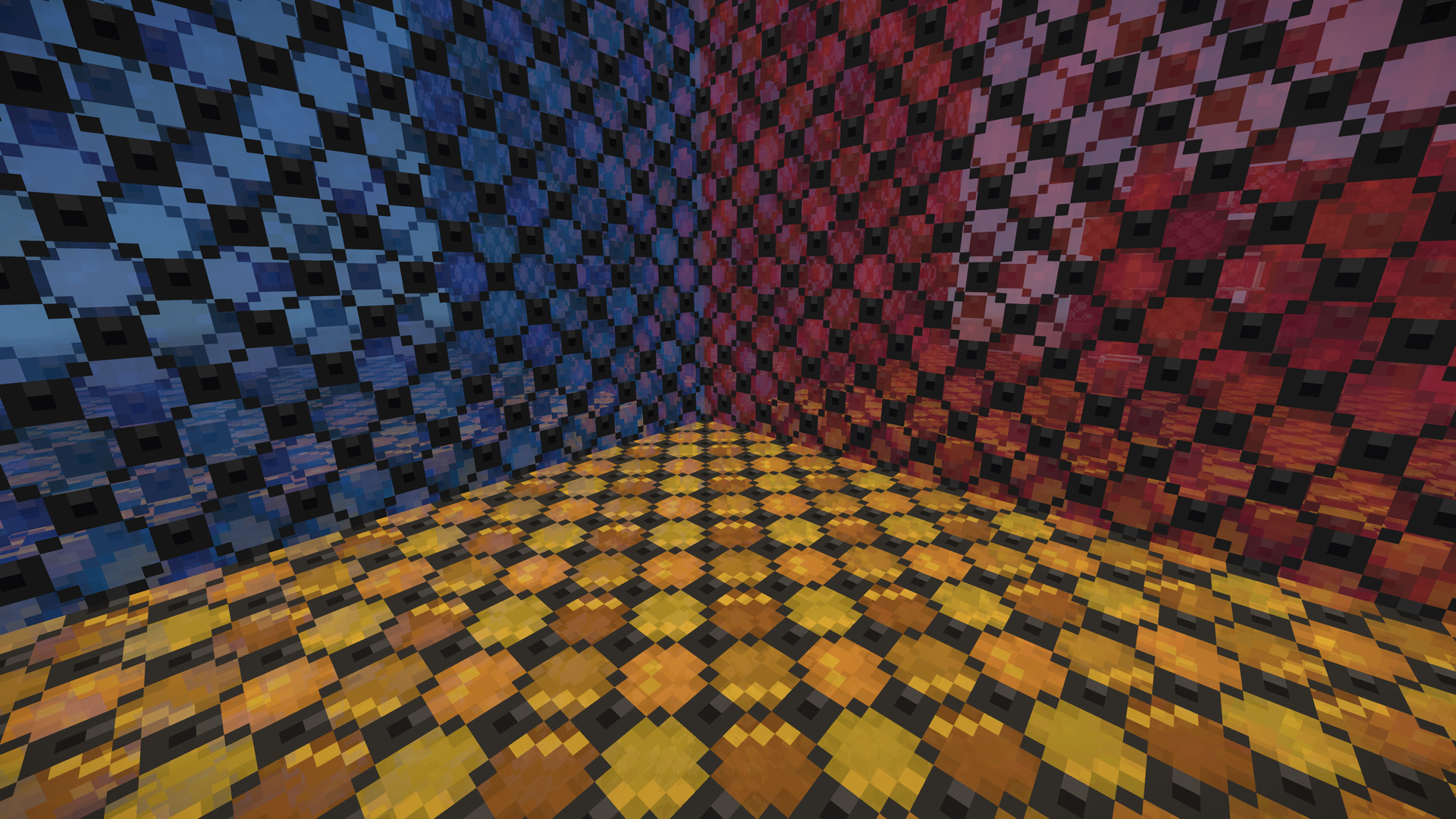 SortedOrder-independent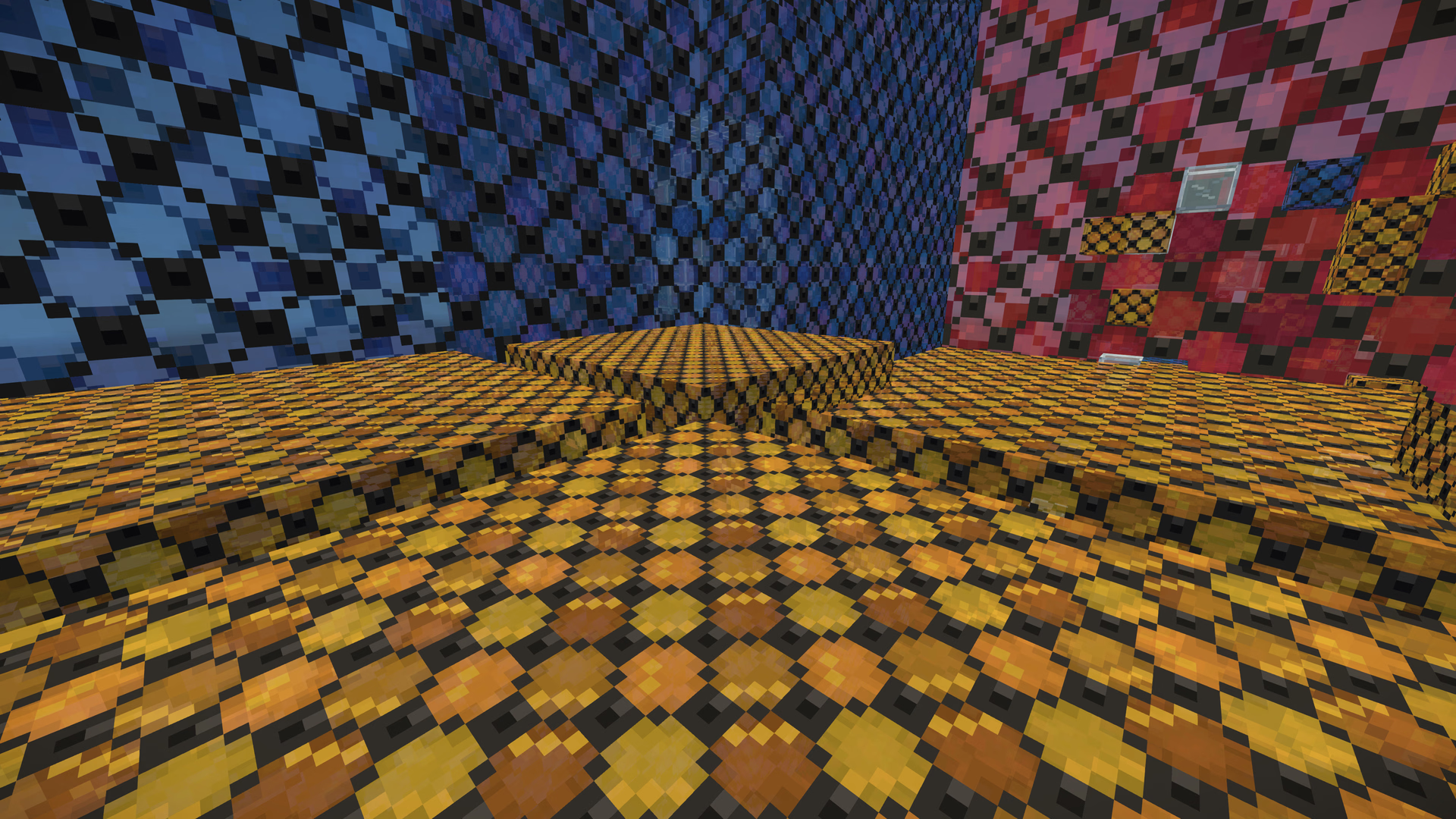
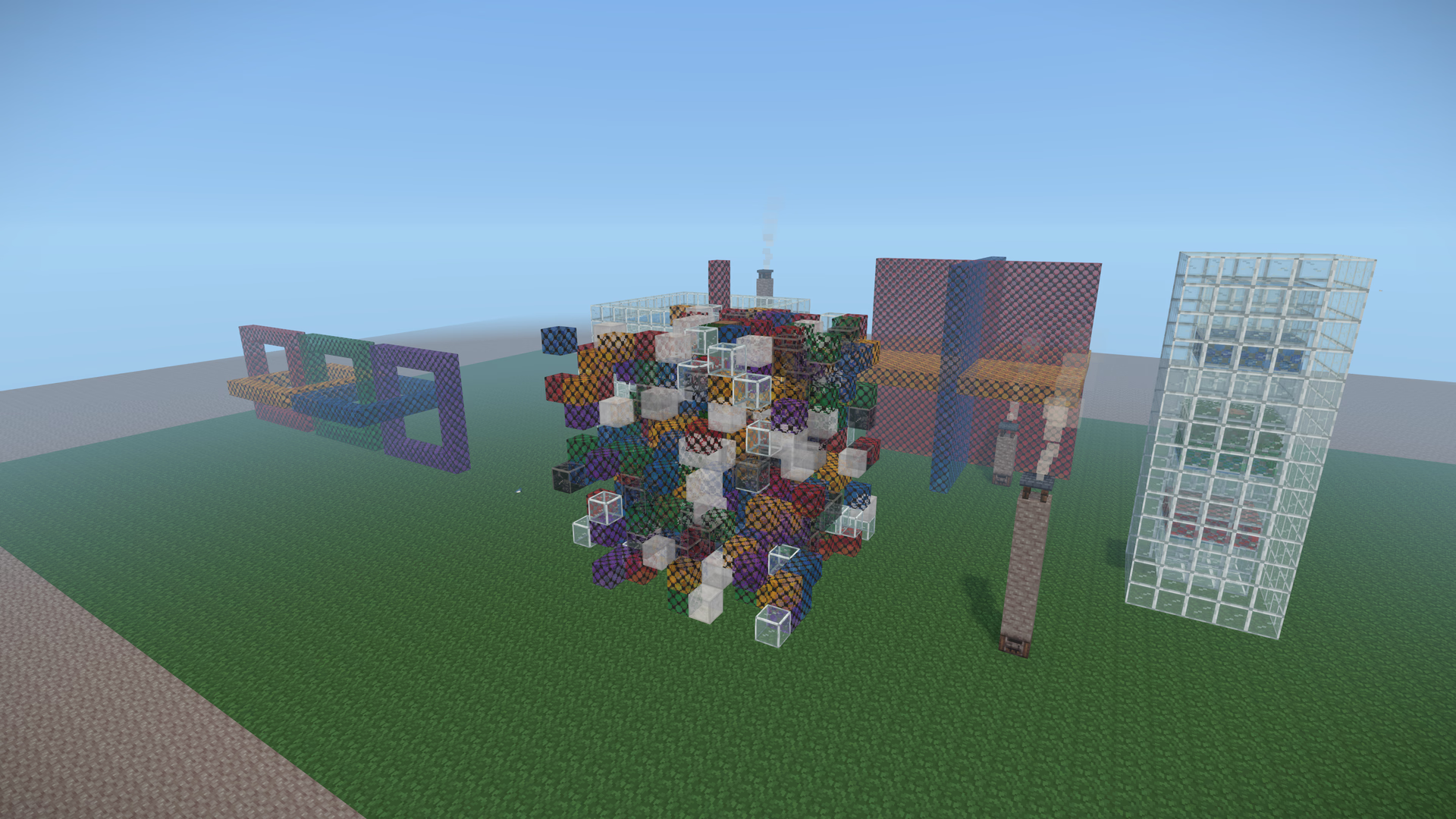 SortedOrder-independent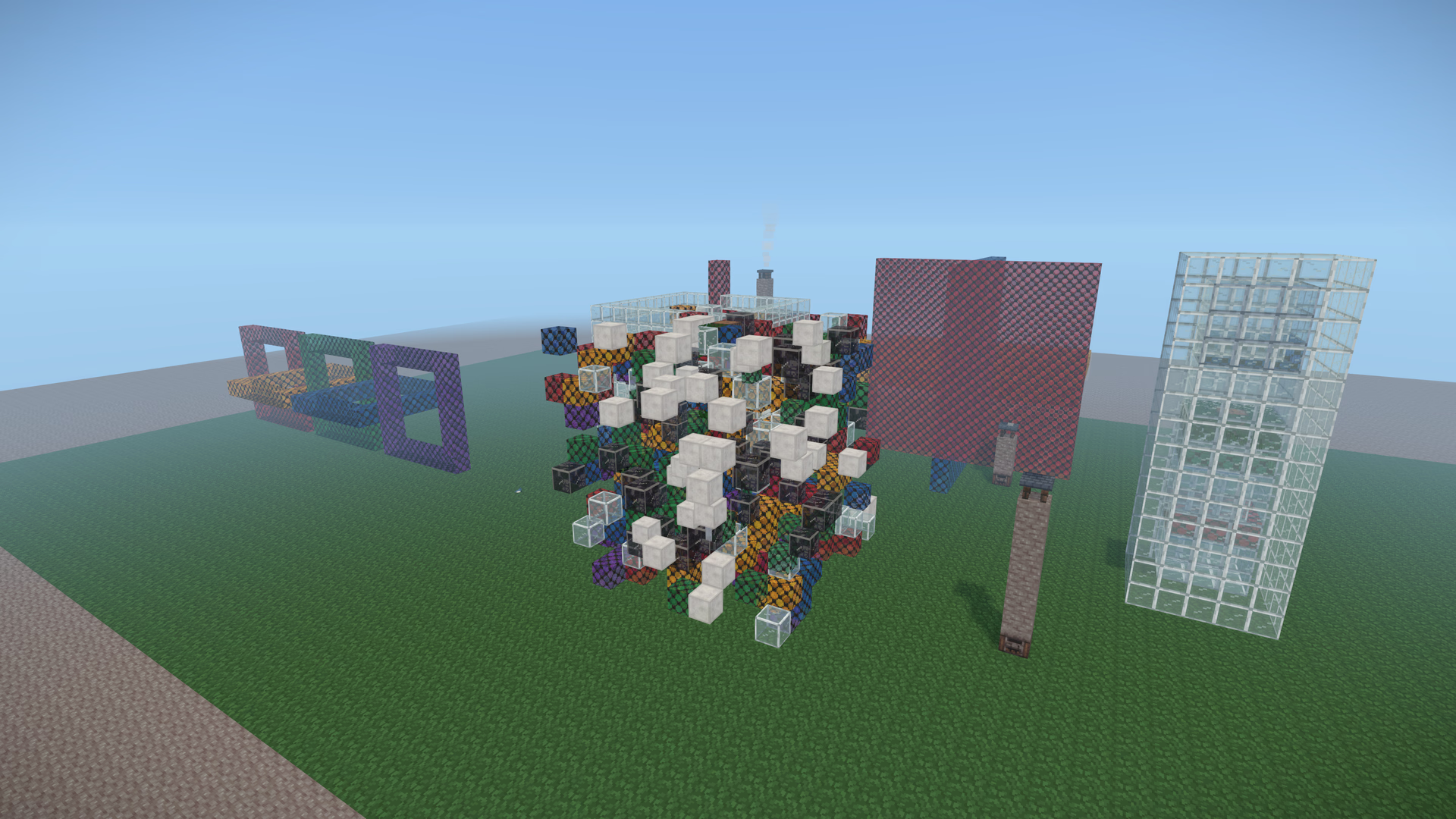
And the same pass in a scene you can take apart: orbit it, switch to sorted, shuffle the draw order, and watch the sorted picture change while the order-independent one doesn't.
A pool with a stained-glass panel standing in it, a red glass column, bubbles under the surface and smoke rising in front. The debug views show what the accumulation holds after the last pass.
References
- Morgan McGuire and Louis Bavoil, Weighted Blended Order-Independent Transparency, Journal of Computer Graphics Techniques 2(2), 2013. The technique, and the family of weight curves this one comes from.
- Cedrick Münstermann, Stefan Krumpen, Reinhard Klein and Christoph Peters, Moment-Based Order-Independent Transparency, I3D 2018.
- Cass Everitt, Interactive Order-Independent Transparency, NVIDIA, 2001 (depth peeling), and Louis Bavoil and Kevin Myers, Order Independent Transparency with Dual Depth Peeling, NVIDIA, 2008.
- Eric Enderton, Erik Sintorn, Peter Shirley and David Luebke, Stochastic Transparency, I3D 2010.
- three.js,
src/renderers/webgl/WebGLRenderLists.js(the transparent sort) andsrc/renderers/WebGLRenderer.js(the double-sided two-pass draw, andsetTransparentSort). - The source lives in Voxelize, under
packages/core/src/core/world/:order-independent-transparency.ts(the pass),see-through-texels.ts(the texel split),water-depth.ts(the water's depth) andindex.ts(prepareTransparencyand the chunk wiring).